sabato 17 dicembre 2022

embed video youtube video - sistema leggero per visualizzare video senza controller e logo


per lavoro sto usando questo

embed video youtube video - sistema leggero per visualizzare video senza controller e logo

e mi trovo bene


https://github.com/paulirish/lite-youtube-embed

questo è comodo per usarlo in linea senza installare nulla

https://github.com/justinribeiro/lite-youtube

martedì 9 agosto 2022

4 modi di pulire il tuo macosx - 2022

 4 modi di pulire il tuo macosx - 2022


  1.  Libreria cache
  2. libreria log
  3. var log
  4. musica, cartella del programma Musica dentro la cartella musica
  5. libreria mobitrix (whatsapp)
  6. libreria telegram
  7. cancella le app che non usi con appcleaner
  8. svuota cestino
  9. riavvia

domenica 9 maggio 2021

finalmente un modo per usare i led rgbw con fastled

 Ciao !


condivido con voi questo hack della lib fastled

ringraziamo l'autore che si è prodigato nell'aggiungere due funzioni per impostare i bit giusti per la comunicazione di strisce led rgbw


https://gist.github.com/atuline/be18b2248520e390cf9b9c8c27018f3e


sabato 9 maggio 2020

radio button da cerchi a quadrate e spunte personalizzate

ciao a tutti
ho trovato questo bellissimo trick per i nostri sviluppi web
soddisfare le richieste del designer non è sempre una passeggiata
e trovare i trick su internet ci fa perdere quei cinque minuti a provarne alcuni
eccone uno a colpo sicuro per voi lettori

https://codepen.io/DocMcBrown/pen/VjbpGQ

trasformare check box tondi in quadrati! Magia

giovedì 4 aprile 2019

arduino mini clone

programmandolo con FTDI232 esterno
un arduino mini clone
cablato facendo attenzione ai pin gnd e cts da invertire

per programmarlo installare i nuovi driver
prima rimuovere i vecchi ftdi del macos come indicato nella guida
https://www.ftdichip.com/Support/Documents/AppNotes/AN_134_FTDI_Drivers_Installation_Guide_for_MAC_OSX.pdf

e poi installare i nuovi

nell'ide impostare arduino nano con bootloader vecchio
come fosse un nano v3 clone

allora siiii!!!!

ardu nano v3 su mac

evvai

ora si può

https://blog.sebastian-martens.de/technology/connecting-arduino-nano-to-mac-os-x/

testato con la versione 1.5


giovedì 14 giugno 2018

use of memory arduino like board ide

The most straightforward answer is:
The difference here is that
char *s = "Hello world";
will place Hello world in the read-only parts of the memory and making s a pointer to that, making any writing operation on this memory illegal. While doing:
char s[] = "Hello world";
puts the literal string in read-only memory and copies the string to newly allocated memory on the stack. Thus making
s[0] = 'J';
legal.
A more lengthy explanation would include what segments the memory is stored in, and how much memory is allocated:
Example:                       Allocation Type:     Read/Write:    Storage Location:   Memory Used (Bytes):
===========================================================================================================
const char* str = "Stack";     Static               Read-only      Code segment        6 (5 chars plus '\0')
char* str = "Stack";           Static               Read-only      Code segment        6 (5 chars plus '\0')
char* str = malloc(...);       Dynamic              Read-write     Heap                Amount passed to malloc
char str[] = "Stack";          Static               Read-write     Stack               6 (5 chars plus '\0')
char strGlobal[10] = "Global"; Static               Read-write     Data Segment (R/W)  10
References

  1. What is the difference between char s[] and char *s in C?, Accessed 2014-09-03, <https://stackoverflow.com/questions/1704407/what-is-the-difference-between-char-s-and-char-s-in-c>
  2. Difference between declared string and allocated string, Accessed 2014-09-03, <https://stackoverflow.com/questions/16021454/difference-between-declared-string-and-allocated-string>

lunedì 7 maggio 2018

path in windows a 64 bit

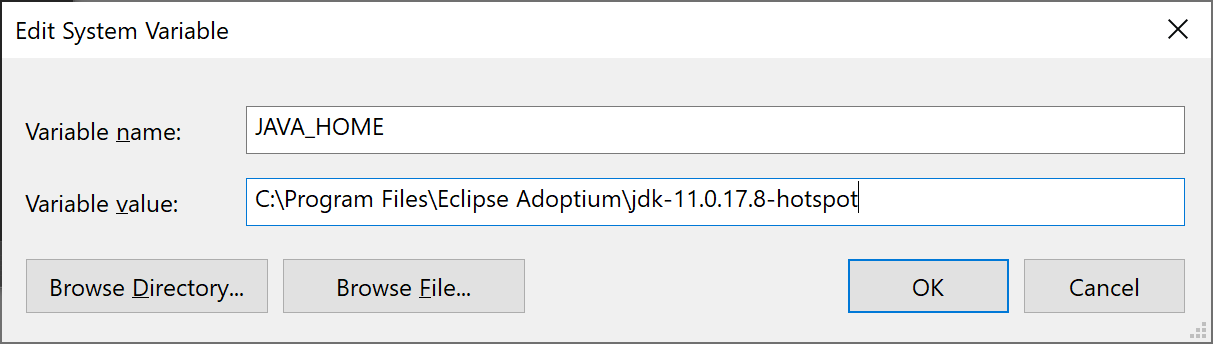
Note for Windows users on 64-bit systems
Progra~1 = 'Program Files' Progra~2 = 'Program Files(x86)'
https://confluence.atlassian.com/display/DOC/Setting+the+JAVA_HOME+Variable+in+Windows


Set the JAVA_HOME Variable

To set the JAVA_HOME variable:
  1. Locate your Java installation directory
    If you didn't change the path during installation, it'll be something like C:\Program Files\Java\jdk1.8.0_65
  2. Do one of the following:
    Windows 7 – Right click My Computer and select Properties > Advanced 
    Windows 8 – Go to Control Panel > System > Advanced System SettingsWindows 10 – Search for Environment Variables then select Edit the system environment variables
  3. Click the Environment Variables button.
  4. Under System Variables, click New.
  5. In the Variable Name field, enter either:
    • JAVA_HOME if you installed the JDK (Java Development Kit)
      or
    • JRE_HOME if you installed the JRE (Java Runtime Environment) 
  6. In the Variable Value field, enter your JDK or JRE installation path .
    If the path contains spaces, use the shortened path name. For example, C:\Progra~1\Java\jdk1.8.0_65

     
    Note for Windows users on 64-bit systems
    Progra~1 = 'Program Files'Progra~2 = 'Program Files(x86)'
  7. Click OK and Apply Changes as prompted
You'll need to close and re-open any command windows that were open before you made these changes, as there's no way to reload environment variables from an active command prompt. If the changes don't take effect after reopening the command window, restart Windows.

Set the JAVA_HOME variable via the command line

If you would prefer to set the JAVA_HOME (or JRE_HOME) variable via the command line:
  1. Open Command Prompt (make sure you Run as administrator so you're able to add a system environment variable).
  2. Set the value of the environment variable to your JDK (or JRE) installation path as follows:
    setx -m JAVA_HOME "C:\Progra~1\Java\jdk1.8.0_XX"
    If the path contains spaces, use the shortened path name.
  3. Restart Command Prompt to reload the environment variables then use the following command to check the it's been added correctly. 
    echo %JAVA_HOME%
    You should see the path to your JDK (or JRE) installation. 
Last modified on Nov 14, 2017

giovedì 5 aprile 2018

apostrofi nei numeri - excel - openoffice - libreoffice


quando sbattete la testa con gli apostrofi nei numeri in excel di openoffice? si risolve così!!


Find '.+' (or similar) and Replace with '&' effectively re-enters the contents of cells. This can be used to 'strip' formatting automatically applied by Calc (often needed to 'clean' data imported from the clipboard or badly formatted files), for example, to convert text strings consisting of digits, into actual numbers (the cells must first be correctly formatted 'number'). The leading apostrophes, telling Calc to treat the numbers as text, are removed.

https://wiki.openoffice.org/wiki/Documentation/How_Tos/Regular_Expressions_in_Calc

lunedì 1 gennaio 2018

Google Chrome causing you 100 Disk Usage? This may be a fix for you.

I found my problem. It was a corrupt History file in Chrome.

I noticed the Clear Browsing Data (under More Tools) was not able to get a total for the "Browsing History" section.

Then from the Google Chrome Help Forum (Syd Hutchinson) I found this procedure:

Firstly make sure Chrome is switched off. Go into task manager and make double sure there are no instances of it running. If it has been open it is sometimes easier to close it and then reboot your machine to ensure it is closed. Now open file manager and go to C:\Users\*your id*\AppData\Local\Google\Chrome\User Data\Default. Replace *your id* with your user id. Now look for a file named History and delete it. Just that one file. If it was like mine it will probably be a large file. Mine was 500Mb. Close file manager and open Chrome and all should be ok. A new History file will be created and it will now be just a few kbs.

Deleting the one file "History" fixed the problem! Such a relief!

-Rick-

http://www.tomsguide.com/answers/id-2689679/google-chrome-causing-100-disk-usage-fix.html     

sabato 18 marzo 2017

Grazie al fuoco

Ti ringrazio Energia del fuoco che mi fai digerire
digerire quello che vedo
digerire quello che mangio
digerire quello che sento

Che tu possa sempre ardere, purificare e nutrire il mio Essere


sabato 31 dicembre 2016

wordpress: passare valori GET e POST

ci sono riuscito aggiungendo in functions.php questo pezzo alla fine del file
creando uno shortcode box
e poi flushare la memoria
https://typerocket.com/flushing-permalinks-in-wordpress/


/*
-------------------------------------------------------------------
MIE FUNZIONI
*/
$var_testo_utente = "html";
$GLOBALS['var_testo_utente'] = "html2";

function wpd_usid_endpoint(){
    add_rewrite_endpoint( 'usid', EP_ROOT );
}
add_action( 'init', 'wpd_usid_endpoint' );

function wpd_usid_parse( $request ){
    if( array_key_exists( 'usid', $request->query_vars ) ){
        // do your POST processing...

//$userPassato = empty( $request['usid'] );
$userPassato = $request->query_vars['usid'];
$GLOBALS['var_testo_utente'] = "Questo testo + ". $userPassato . " utente arrivato";


        //die;
    }
}
add_action( 'parse_request', 'wpd_usid_parse' );


function box_html_render($atts, $content = null) {
extract(shortcode_atts(array(
"type" => "info"
), $atts));
//return '<div class="alert alert-'.$type.'">'.$content.'</div>';
return "PPPOOOXX ".$content. " KK " .$GLOBALS['var_testo_utente'];
}
add_shortcode("box", "box_html_render"); // [box type="uno"] [/box]


per poi vedere una lista degli user
https://codex.wordpress.org/Class_Reference/WP_User_Query

https://codex.wordpress.org/Function_Reference/get_users


venerdì 30 dicembre 2016

un bagno d'inverno

Un ritmo, una melodia, una voce, una nota singola, un'aria, un tema. Tutto questo è la musica, tutto questo arriva dentro di noi e fa emergere le cose dentro. Se siete come me, che la musica smuove e fa emergere, concedetevi questa immersione con le cuffie a letto, o in piedi lasciandoti trasportare. E poi se volete condividete le esperienze. Ieri era luna nuova e domani fine dell'anno, laviamoci via le cose pesanti e negative con questo bagno

martedì 22 novembre 2016

cos'è animazione


cosa ci spiega Brad?

piu cerchi di controllare eccessivamnete il processo creativo piu lo limiti

animazione non è un genere, è una forma d'arte, ci puoi fare tutti i generi


Brad Bird, writer and director of animated films 'The Iron Giant', 'The Incredibles' and 'Ratatouille', gives an insight into his writing process, how he directs animation and why many people fundamentally misunderstand the medium. Subtitles available.
https://vimeo.com/189791698

mercoledì 2 novembre 2016

Fabmodules for pcb

this is a little tutorial
maybe it's better to put this on insctructables
this is the version of draft

0. crea pcb

1. save png > 600px

2. photoshop
bordi dimensioni quadro 20px in fuori nero
tracce

buchi
layer riempi buchi

image tresold 0.8
tool bulino 0.2
offset 0.8

( good parameters
tracce inverti immagine
bulino tracce rame 1.7
cut 0.2 depth
 tool 0.4
off 10
50%
)

Parameters to try
cut 0.15
tool 0.5
off 8
60%

buchi immagine normale
cornice di 2 mm bianca
cornice di 1.5mm esterna nera


3. fabmodules Use
tracce inverti immagine
buchi immagine normale

venerdì 16 settembre 2016

Tarantelle

Molti si chiedono a cosa serve la meditazione, alcuni hanno paura perché sembrano cose di alcune sette che si riuniscono a fare cose strane, beh anche io avevo paura.
Fisiologicamente parliamo di attivare il cervello specialmente l'emisfero destro.
Tecnicamente si può fare in mille modi, e in tempi antichi ogni popolo ha definito i suoi.
Nella nostra Italia attualmente ci sono le preghiere come il rosario, i balli popolari, le tarantelle.
I principi di queste pratiche li ritroviamo in tutto il mondo, danze intorno al fuoco, tribali, litanie che vanno avanti per ore, liturgie di un'intera giornata.
Il video che vi mostro qui sotto mi ha entusiasmato! Per vedere la realtà in maniera completa bisogna mettersi diversi tipi di occhiali. Uno è lo stato attuale di coscienza, poi ci sono i diversi stati alterata di coscienza. Ne potete avere un assaggio mentre ci addormentiamo, o mentre siamo estasiati da un'opera d'arte.

Nello stato normale di coscienza possiamo integrare quello che si percepisce negli stati non ordinari di coscienza, cioè ricordarci che esistono molte cose anche se non le vediamo tutti i giorni. Come sapere che c'è la torre Eiffel a Parigi, non dobbiamo tornarci una volta al giorno per sapere se esiste.

Buona visione!